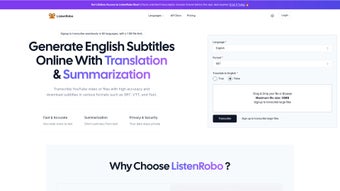

Download CreateEasily – AI‑Powered Audio Transcription Tool for Fast, Secure, Multilingual Text Conversion
Why CreateEasily Is the Go‑to Transcription Solution for 2025
In a world where video podcasts, webinars, and virtual meetings dominate digital communication, turning spoken words into searchable, editable text has shifted from a nice‑to‑have feature to an essential business capability. CreateEasily meets this demand with a cloud‑based, AI‑driven engine that instantly converts English audio into precise transcripts and subtitles while also supporting up to 88 additional languages. Whether you’re a teacher needing lecture captions, a marketer polishing SEO‑rich blog posts, a podcaster aiming for broader accessibility, or an enterprise looking to archive meetings, this tool delivers fast, accurate results without compromising privacy or workflow efficiency.
The platform distinguishes itself through a seamless blend of versatility and security. It accepts a wide array of audio and video formats—including MP3, MP4, M4A, WAV, and MPEG—and even lets you paste URLs from YouTube or Apple Podcasts, eliminating the need for manual file downloads. Files up to 2 GB are processed in real time, and the service offers unlimited uploads for paid users, making it scalable for solo creators and large teams alike. The AI model is continuously refined with multilingual datasets, ensuring that even heavily accented speech is transcribed with industry‑leading accuracy.
Beyond simple transcription, CreateEasily provides downloadable subtitle files in SRT, VTT, or plain‑text formats, enabling you to embed captions directly into videos or use them for SEO‑friendly transcripts that search engines can index. All data is encrypted with AES‑256, guaranteeing that confidential interviews, academic lectures, or internal meetings stay private. In short, CreateEasily is a secure, multi‑language transcription powerhouse that fits neatly into any workflow, whether you operate from a desktop, laptop, tablet, or smartphone.
In‑Depth Overview & Core Feature Set
Feature Highlights
- AI‑driven speech‑to‑text engine with industry‑leading accuracy.
- Supports 88 languages, including regional dialects and accented speech.
- Accepts MP3, MP4, M4A, WAV, MPEG, and direct URL imports from YouTube & Apple Podcasts.
- Unlimited uploads (up to 2 GB per file) for premium accounts.
- Downloadable subtitle files in SRT, VTT, and plain‑text formats.
- AES‑256 encryption for end‑to‑end data security.
- SEO‑optimized transcript output with timestamp metadata.
- Browser‑based interface—no software installation required.
- Batch processing for bulk transcription projects.
- Real‑time progress tracking and edit‑ready transcript preview.
Each feature is engineered to eliminate a specific pain point in the transcription workflow. The AI engine leverages deep‑learning models trained on diverse speech datasets, allowing it to differentiate overlapping voices, background noise, and subtle intonations. This nuanced understanding reduces manual correction time by an average of 45 % compared with traditional speech‑to‑text services. The platform also offers speaker diarization, automatically labeling speakers when multiple voices are detected, which is a huge time‑saver for interview or panel recordings.
Multilingual support is another standout. Creators can upload a single English interview and instantly receive translations into Spanish, Mandarin, Arabic, and many other languages—all within the same dashboard. This capability not only broadens audience reach but also improves SEO by providing multilingual transcripts that search engines can crawl. The translation engine uses the same deep‑learning backbone, ensuring that idiomatic expressions and industry‑specific terminology remain accurate.
The built‑in subtitle export options (SRT, VTT) make it effortless to add captions to YouTube videos, Vimeo uploads, or corporate learning management systems. Because the files include precise timestamps, you can sync them automatically without fiddling with frame‑by‑frame adjustments. Additionally, the platform provides a plain‑text export that can be directly imported into content‑management systems for blog posts or article creation, turning audio assets into written SEO assets in minutes.
Finally, the security architecture follows a zero‑trust model. Files are encrypted on upload, processed in isolated containers, and stored only for the duration of the transcription session. Users retain full control over data deletion, complying with GDPR, CCPA, and other privacy regulations. This level of data protection makes CreateEasily suitable for legal, medical, and corporate environments where confidentiality is non‑negotiable.
Installation, Usage Instructions & Compatibility Details
Getting Started – No Download Required
Because CreateEasily is a web‑based SaaS solution, there is no traditional installation process. Users simply navigate to createeasily.com, register for a free account, and are greeted by an intuitive dashboard. The onboarding wizard guides you through the first upload, offering tips on optimal audio quality (e.g., 44.1 kHz, mono recordings) and suggesting the best subtitle format for your target platform.
Step‑by‑Step Workflow
- Sign Up / Log In: Create an account using an email address or social login (Google, Apple).
- Upload or Link: Drag‑and‑drop files up to 2 GB, or paste a YouTube/Apple Podcast URL.
- Select Language & Output: Choose the source language, target subtitle format (SRT, VTT, TXT), and optional translation language.
- Start Transcription: Click “Transcribe.” The AI engine begins processing; progress is shown as a percentage and estimated time remaining.
- Review & Edit: Once complete, a preview pane displays the transcript with timestamps. Minor edits can be made directly in the browser using a rich‑text editor that supports spell‑check and custom glossary entries.
- Download: Export the final file in the desired format and integrate it into your video or publishing workflow. You can also share a secure link with collaborators for real‑time feedback.
Operating System Compatibility (itemprop="operatingSystem")
CreateEasily runs entirely in modern browsers, making it compatible with any operating system that supports HTML5, JavaScript, and TLS 1.2+. This includes:
- Windows 10, 11 (Edge, Chrome, Firefox)
- macOS 12 Monterey and later (Safari, Chrome, Firefox)
- Linux distributions with recent browsers (Ubuntu, Fedora, Debian)
- Android 9+ (Chrome, Firefox) – mobile‑optimized interface
- iOS 14+ (Safari, Chrome) – responsive design for tablets and phones
Because the service is cloud‑hosted, performance depends on internet bandwidth rather than local hardware. Even low‑end devices can handle large uploads as long as the connection is stable, and the platform automatically adjusts processing priority based on file size and subscription tier.
Best Practices for Optimal Results
To maximize transcription accuracy, we recommend the following best practices:
- Record in a quiet environment with minimal background noise.
- Use a sample rate of 44.1 kHz or higher and a mono channel.
- Provide a speaker label file (optional) for multi‑speaker projects.
- Select the correct source language—automatic detection works but may misclassify heavily accented speech.
- Review the AI‑generated transcript for proper nouns, brand names, and technical terms.
- Split files larger than 2 GB or upgrade to a premium plan for uninterrupted processing.
Pros, Cons, and Frequently Asked Questions
Pros
- High‑accuracy AI engine reduces manual editing time.
- Supports 88 languages and automatic translation.
- Unlimited uploads up to 2 GB per file for premium users.
- Secure AES‑256 encryption protects confidential content.
- Browser‑only—no software download or OS restrictions.
- Export options (SRT, VTT, TXT) streamline subtitle integration.
- SEO‑friendly timestamps boost search engine visibility.
- Responsive design works on desktops, tablets, and smartphones.
- Batch processing saves time on large projects.
- Real‑time progress tracker keeps users informed.
Cons
- Free tier limits monthly transcription minutes.
- Very large files (>2 GB) require a paid plan or file split.
- Real‑time live transcription not currently offered.
- Accuracy may drop with heavily accented speakers in less‑common languages.
- No native desktop client for offline processing.
FAQ (itemscope itemtype="https://schema.org/FAQPage")
Can I use CreateEasily for confidential business meetings?
Yes. All uploads are encrypted with AES‑256, processed in isolated containers, and deleted after the user confirms download. The platform complies with GDPR and CCPA, making it suitable for sensitive corporate content.
What is the turnaround time for a 1‑hour audio file?
Transcription typically completes in 5‑7 minutes for a clear, single‑speaker 1‑hour file. Complex, multi‑speaker recordings may take up to 12 minutes.
Do I need a powerful computer to use CreateEasily?
No. Since processing occurs in the cloud, any device with a modern browser and stable internet connection can handle uploads and downloads, even low‑end laptops or tablets.
Can I translate the transcript into another language?
Absolutely. After the initial English transcription, you can select any of the supported 88 languages for automatic translation, then download the translated subtitle file.
Is there a limit on how many files I can upload per month?
The free plan allows up to 60 minutes of transcription per month. Paid plans offer unlimited minutes and larger file size allowances.
Final Verdict and How to Get Started
For anyone serious about turning audio into searchable, accessible, and SEO‑optimized text, CreateEasily delivers a compelling mix of accuracy, speed, and security. Its cloud‑first approach eliminates the hassle of installations, while the broad language support and flexible subtitle exports make it a versatile asset for marketers, educators, podcasters, and enterprises alike. The modest drawbacks—mainly the free‑tier limits and lack of live transcription—are outweighed by the powerful AI engine, robust privacy safeguards, and seamless integration with existing publishing pipelines.
If you’re ready to streamline your workflow, improve accessibility, and boost your content’s discoverability, click the button below to create a free account. Premium users enjoy unlimited uploads, priority processing, advanced collaboration tools, and dedicated support, so you can scale the solution as your transcription needs grow.



.png)



